Last Updated: November 4, 2026
Quick Summary
The best ergonomic office chairs for posture are the ones you will actually adjust and sit in correctly, so fit beats feature count. Set seat height, seat depth, lumbar support, armrests and recline tension in that order, and pair the chair with daily movement.
- The Herman Miller Aeron starts at $1,728.75 and comes in three sizes.
- The Steelcase Leap V2 uses LiveBack technology that changes shape with your spine.
- The Branch Ergonomic Chair Pro costs $499.00 and suits remote workers wanting value.
- Set seat height first, then depth, lumbar support, armrests and recline tension.
- Budget chairs often use fixed lumbar bumps that can push you into an uncomfortable arch.
Table of Contents
- Why the Best Ergonomic Office Chairs for Posture Matter More Than You Think
- Quick Comparison: Top Ergonomic Office Chairs for Posture
- 1. Herman Miller Aeron: The Gold Standard for Lumbar Support
- 2. Steelcase Leap V2: Best Chair for Posture Correction with LiveBack Technology
- 3. Branch Ergonomic Chair Pro: Best Ergonomic Office Chair for Long Hours on a Budget
- 4. Herman Miller Sayl: Best Office Chair for Posture and Neck Pain in Small Spaces
- The Bottom Line on Choosing a Chair for Posture
- Frequently Asked Questions
Why the Best Ergonomic Office Chairs for Posture Matter More Than You Think
Most people buy an office chair like a mattress: three minutes in a showroom, then years discovering it isn’t right. The best ergonomic office chairs for posture solve a problem that builds slowly, so many ignore it until their back forces the issue.
A chair is not a treatment, but the right one can remove a steady source of strain, which makes everything else work better. For a deeper look at building better posture habits, see our guide on how to improve posture to reduce pain.
Most buying guides rank chairs by feature count. A chair with twelve adjustments you never touch is worse than one with five you set correctly once. Fit beats features.
Below, we walk through the chairs worth your money in 2026 and how to set up whichever you choose.
Quick Comparison: Top Ergonomic Office Chairs for Posture
The table below summarizes our picks by price, best use case, and the single feature that justifies the purchase.
| Chair | Starting Price | Best For | Standout Feature |
|---|---|---|---|
| Herman Miller Aeron | $1,728.75 | Long-term daily use, all body types | Adjustable lumbar support with Pellicle mesh |
| Steelcase Leap V2 | $1,350.00 | Lower back pain during long hours | LiveBack technology that follows the spine |
| Branch Ergonomic Chair Pro | $499.00 | Remote workers wanting value | Adjustable lumbar height and depth |
| Herman Miller Sayl | $600.00 | Small spaces and neck pain | 3D Intelligent back suspension |
| ProtoArc EC200 | $200.00 | First ergonomic upgrade on a budget | Headrest and armrest adjustability |
| Atlas Ergonomic Chair | $269.00 | Best value under $300 | Adjustable lumbar support and mesh back |
| BestOffice Ergonomic Chair | $119.00 | Students and casual desk use | Integrated lumbar support |
1. Herman Miller Aeron: The Gold Standard for Lumbar Support
The Aeron built the category’s reputation. Its adjustable lumbar support and breathable Pellicle suspension remain the benchmark for pressure distribution, and the Kinemat tilt lets the seat move with you.
The drawback is price, which puts it out of reach for many home offices. But if you sit for a living, this is a chair you keep for a decade or more.
Key Features
- Fully adjustable lumbar support system
- Breathable Pellicle suspension material
- Kinemat tilt mechanism for natural movement
Pros and Cons
Pros: Industry-leading adjustability, excellent heat dissipation from the mesh design, and proven durability.
Cons: The highest price point on this list by a wide margin.
2. Steelcase Leap V2: Best Chair for Posture Correction with LiveBack Technology
The Leap V2’s LiveBack technology is why we recommend it to people with existing lower back pain: the backrest changes shape as your spine moves, so support follows you. Adjustable seat depth and a flexible seat edge take pressure off the thighs, helping with the numbness long sitters report.
It is an investment. For someone already managing back pain, it may be the more targeted choice of the two premium chairs.
Key Features
- LiveBack technology that changes shape with the spine
- Adjustable seat depth and width
- Flexible edge seat to relieve pressure on thighs
Pros and Cons
Pros: Highly customizable fit for different body types, strong long-term durability.
Cons: Expensive for a home office setup.
3. Branch Ergonomic Chair Pro: Best Ergonomic Office Chair for Long Hours on a Budget
The Branch Ergonomic Chair Pro delivers adjustable lumbar height and depth, a high-density foam seat, multiple tilt lock positions, and adjustable armrests, a serious feature set for its class.
Start your wellness journey today! →
What you give up is refinement: fewer adjustment points, and the foam will not hold its shape as long as a mesh suspension. For a remote worker logging long hours who cannot justify four figures, this is our pick.
Key Features
- Adjustable lumbar support height and depth
- High-density foam seat cushion
- Multiple tilt lock positions
Pros and Cons
Pros: Strong feature-to-price ratio, modern look that suits a home office.
Cons: Fewer adjustment options than premium models.
4. Herman Miller Sayl: Best Office Chair for Posture and Neck Pain in Small Spaces
Neck pain and small rooms are an underrated pairing.
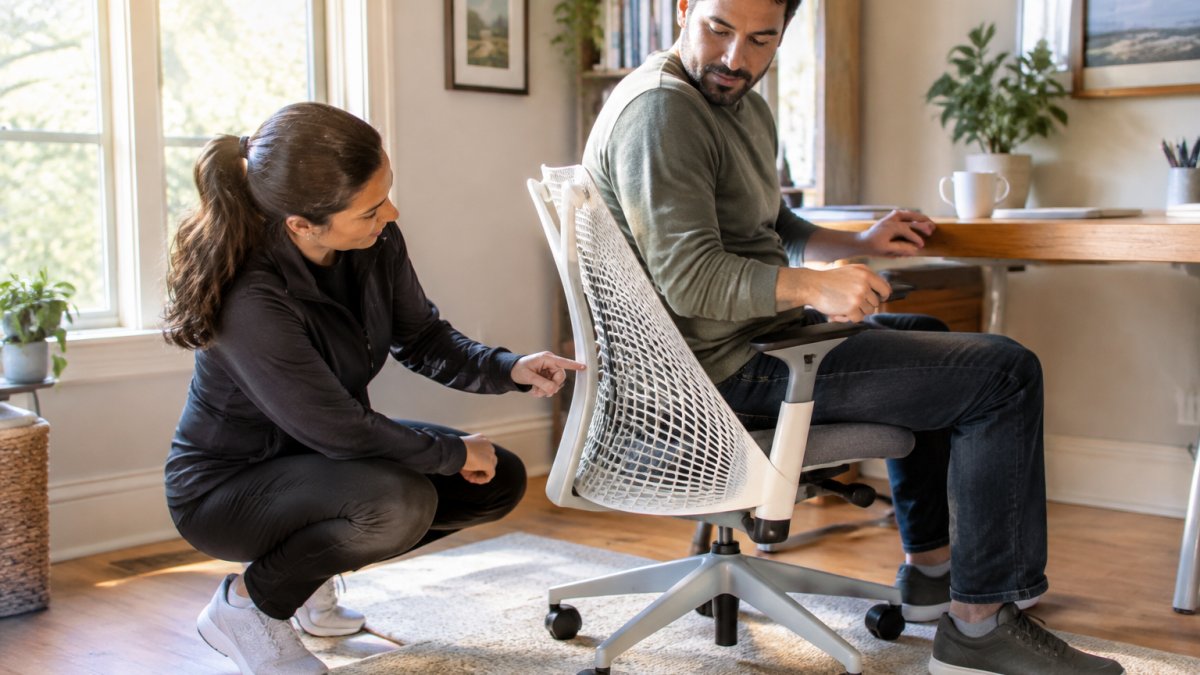
It is positioned as an entry point into Herman Miller’s lineup. We often point patients toward daily habits to prevent tech neck alongside their seating changes.
The woman is American.
Troubleshooting: what the symptom is telling you
- Lower back aches after an hour. The lumbar pad is too low or too soft. Raise it to the belt line and increase the firmness if the chair allows.
- Numbness or tingling in the thighs. The seat edge is pressing into the underside of the thigh. Shorten the seat depth or add a slight downward tilt to the seat pan.
- Neck and shoulder tension. The monitor is usually the culprit, not the chair. Raise the monitor so the top of the screen is at or slightly below eye level, and lower the armrests so your shoulders drop.
The part the hardware cannot do
Chair adjustment handles your position; it does not build the endurance to hold that position. Simple daily movement and stretching can complement a well-adjusted chair.
For a full walkthrough, see our step-by-step guide on how to sit at a desk properly. And remember that setup only goes so far: our guide to exercises for upper back strength covers the other half of the equation.
Watch out: if you develop sharp pain, pain that radiates down a leg, or numbness that does not resolve when you stand, stop adjusting and get evaluated.
The Bottom Line on Choosing a Chair for Posture
The best ergonomic office chairs for posture are the ones you will actually adjust and sit in correctly. If you are rebuilding a home office from scratch, our guide to setting up a healthy home office covers the desk, monitor, and lighting alongside the chair.
If posture-related pain has become part of your daily routine, a chair alone will not resolve it.
Frequently Asked Questions
What features should I look for in an ergonomic chair for posture?
Prioritize adjustable lumbar support that fits the curve of your lower back, seat depth that allows two inches between the back of your knees and the seat edge, and adjustable armrests that let your shoulders relax. A synchro-tilt mechanism and breathable mesh or high-density foam also help maintain neutral spine alignment during long hours of sitting. Look for chairs with a weight capacity that matches your needs and caster wheels suited to your floor type.
Can an ergonomic chair actually fix bad posture?
An ergonomic chair supports proper spinal alignment and reduces strain, but it cannot single-handedly fix posture. It works best as part of a broader routine that includes regular movement breaks, core-strengthening exercises, and awareness of body mechanics. For lasting correction, combine a well-adjusted chair with guidance from a healthcare professional who can address underlying muscle imbalances and habitual patterns.
How does lumbar support affect spinal alignment?
Lumbar support maintains the natural inward curve of your lower back, preventing the pelvis from rolling backward and the spine from slumping. Proper support distributes pressure more evenly across the seat pan and reduces load on the lumbar discs. Adjust the support so it fits snugly into the small of your back without pushing you forward. This helps keep your head over your shoulders and reduces neck strain.
Are expensive ergonomic chairs worth the investment for back pain?
High-end chairs can offer more adjustability and may suit daily use over many years. However, a mid-range chair with essential adjustments may suffice for milder discomfort. Consider your daily sitting hours, body type, and specific pain points. A consultation with a wellness professional can help you match chair features to your needs.
How should I adjust my office chair for optimal posture?
Set seat height so your feet rest flat on the floor with knees at about 90 degrees. Adjust seat depth to leave a two-inch gap behind your knees. Position lumbar support in the small of your back, and set armrests so your shoulders are relaxed and elbows bent near 90 degrees. Finally, adjust the recline tension to allow a slight backward lean, and keep your monitor at eye level to avoid neck strain.