

Table of Contents
- What Tech Neck Does to Your Body (And Why Daily Habits Matter)
- Ergonomic Workstation Setup: The Foundation Habit
- How to Fix Forward Head Posture With Daily Corrections
- Tech Neck Exercises You Can Do in 10 Minutes a Day
- Micro-Breaks, Movement, and the Visual Strain Connection
- Sleep Support and Post-Work Recovery Habits to Prevent Tech Neck
- Tools and Equipment That Make These Habits Stick
- When Daily Habits Aren’t Enough: A Root-Cause Approach
- Frequently Asked Questions
Last Updated: September 19, 2026
What Tech Neck Does to Your Body (And Why Daily Habits Matter)
Tech neck is the gradual strain on your cervical spine caused by holding your head forward and down for long stretches. It develops from repetition, not any single bad day, a pattern we see constantly at Holistic & Wellness Medicine in desk-bound patients whose shoulders ache by Friday.
Ergonomic Workstation Setup: The Foundation Habit
The best ergonomic workstation setup puts your screen at eye level, your keyboard at elbow height, and your feet flat on the floor. Get this wrong and every other habit fights an uphill battle.
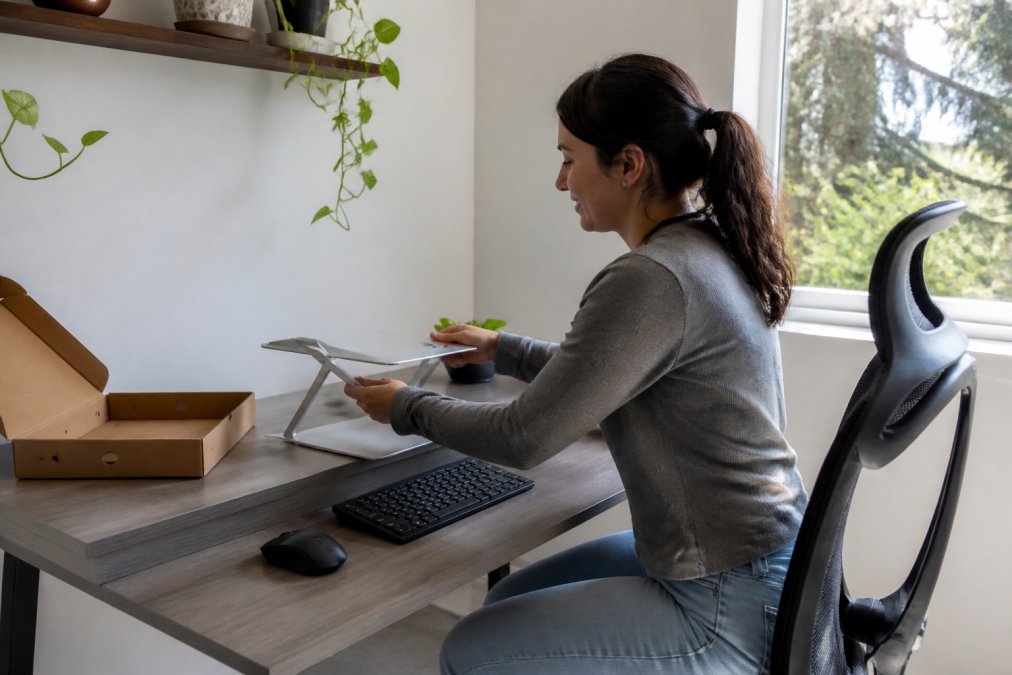
Start with these adjustments, in this order:
- Set chair height so your feet rest flat and your thighs are roughly parallel to the floor
- Raise your monitor or laptop so the top third of the screen sits at eye level
- Position the keyboard so your elbows rest near 90 degrees and your shoulders stay relaxed
- Keep wrists straight, not bent upward
- Pull the screen about an arm’s length away, close enough to read without leaning, far enough that you are not crowding it
Screen Height, Eye Level, and Neutral Spine Alignment
Screen positioning is the single highest-use change you can make, because it removes the cause rather than treating the symptom. When your screen sits too low, your cervical vertebrae tilt down and your thoracic spine rounds forward; raise it and the head settles back over the shoulders. That neutral spine is where the neck muscles do the least work.
Mobile-Specific Ergonomics: Your Phone Is Half the Problem
Phone posture gets far less attention than desk posture, and it may matter more. Most people check their phones dozens of times a day, each time dropping the chin toward the chest, a desk setup that is perfect from 9 to 5 does nothing for the two hours of scrolling on the couch afterward.
A few phone-specific habits that actually hold up:
- Raise the phone to your face instead of lowering your face to the phone, it looks odd for a week and then becomes automatic
- Use voice dictation for longer messages so your head stays up
- Take calls with earbuds and stand up rather than tucking the phone between your ear and shoulder
- When reading long articles, scroll with your thumb at eye level rather than tilting the screen down
The Visual Strain Connection Most Setups Ignore
Eye strain and neck strain travel together, and this is what separates a setup that works from one that just looks ergonomic on paper. When your eyes tire, you unconsciously lean toward the screen, forward head posture in real time. Squinting at small text, glare on a glossy monitor, or a screen slightly too far away all trigger the same reflex: move the head closer, round the shoulders, and hold.
- Increase text size rather than leaning in to read small fonts
- Reduce glare by positioning the screen perpendicular to windows, not facing them
- Match screen brightness to the room so your pupils are not constantly adjusting
- Follow the 20-20-20 rule, every 20 minutes, look at something 20 feet away for 20 seconds
How to Fix Forward Head Posture With Daily Corrections
Fixing forward head posture means retraining where your head rests, which takes short, frequent corrections rather than one long session. The goal is posture awareness that eventually runs on autopilot.
Try this daily reset:
- Sit or stand tall and imagine a string lifting the crown of your head
- Gently draw your chin straight back, not down
- Hold for five seconds
- Release and repeat ten times
Do not force the chin back with speed or tension. Jerking the neck into position can aggravate the joints you are trying to protect. Move slowly and stop if you feel sharp pain, numbness, or tingling in the arms.
Chin Tucks and Posture Awareness Cues
Chin tucks are the workhorse exercise for forward head posture because they directly target the deep neck flexors that hold your head upright. Pair them with awareness cues you will actually notice, a task-switch reminder, a sticky note on your monitor, or your phone’s stand reminder. The cue does not matter; the interruption does. Awareness without a trigger fades within a week, so attach the correction to something that already happens, like answering a call or refilling your water.
Tech Neck Exercises You Can Do in 10 Minutes a Day
A ten-minute daily routine beats an hour once a week, because the tissues you are working on respond to frequency. Split the ten minutes between stretching tight muscles and strengthening weak ones, stretching alone relieves tension temporarily, but without strength work the head drifts forward again by mid-afternoon.
Stretching Routine for Neck and Shoulder Tension
Work through these slowly, holding each stretch for 20 to 30 seconds:
- Upper trap stretch: tilt your ear toward one shoulder, hold, then switch sides
- Levator scapulae stretch: turn your head 45 degrees, then look down toward your armpit
- Chest opener: clasp your hands behind your back and lift gently
- Thoracic extension: sit tall and arch gently over the back of your chair
Strengthening Exercises for the Thoracic Spine and Cervical Vertebrae
Strength work is what makes the correction stick. Focus on the muscles that pull your shoulders back and hold your head over your spine.
- Chin tucks against light resistance: ten reps, two sets
- Band pull-aparts: squeeze the shoulder blades together, fifteen reps
- Prone Y-T raises: lift the arms into a Y then a T shape while lying face down
- Wall angels: slide your arms up and down a wall while keeping contact
Micro-Breaks, Movement, and the Visual Strain Connection
Micro-breaks are short, frequent pauses that interrupt static posture, and they work better than one long break because muscle fatigue builds continuously while you sit still. Stand every 30 to 45 minutes, walk to refill your water, roll your shoulders, thirty seconds of movement resets the load on your neck. Eye strain and neck strain travel together, because when your eyes tire you unconsciously lean toward the screen, and that lean is forward head posture in real time.
Blink deliberately during screen work. People blink far less often when reading on a screen, which dries the eyes and triggers the lean-in reflex. A few conscious blinks per hour costs nothing and interrupts the cycle before your posture collapses.
Sleep Support and Post-Work Recovery Habits to Prevent Tech Neck
Sleep position either reinforces the day’s corrections or undoes them, eight hours in a bad position can cancel eight hours of good posture. Pillow height matters more than pillow price: too thick pushes the chin toward the chest all night, too thin lets the head drop back. The right height keeps your neck in line with your spine when you lie on your side.
Tools and Equipment That Make These Habits Stick
Equipment does not fix posture on its own, but the right gear removes friction from good habits. The mistake most people make is buying the most visible tool, a posture trainer, a balance ball, a standing desk, before fixing the two things that actually change the angle of the neck: screen height and keyboard position.
| Tool | What It Solves | Approx. Cost | Best For |
|---|---|---|---|
| Adjustable laptop stand | Screen height and eye level | Around $70 | Laptop users without a monitor |
| External keyboard | Elbow and wrist position | Around $110 | Anyone using an elevated screen |
| Wearable posture trainer | Posture awareness reminders | Around $100 | People who forget to correct |
| Standing desk converter | Sitting duration | Around $450 | Long desk sessions |
| Balance ball chair | Core engagement while seated | Around $90 | Encouraging micro-movements |
| Percussive therapy device | Muscle tension relief | Around $200 | Post-work recovery |
How to Choose Without Wasting Money
The order you buy in matters more than the brand you buy.
What to Skip
A few categories are marketed heavily and deliver less than the basics:
- Neck braces and collars, useful short-term after an injury, counterproductive as a daily habit because they let the supporting muscles weaken
- Posture-correcting shirts and straps, they hold you in position while worn and do nothing for the muscles once removed
- Ergonomic chairs without adjustable armrests, the armrests are what let your shoulders relax; a chair without them is only half a solution
Buy the stand and keyboard first. They change your posture automatically. Everything else on the list only helps if you remember to use it, so spend on the tools that work without your attention before you spend on the ones that require it.
Matching the Tool to Your Actual Day
The right purchase depends on where your hours actually go, not on what looks best in a review.
- If you work primarily on a laptop away from a desk, a portable laptop stand and a folding external keyboard are the highest-value pair, because they travel with you
- If you work at a fixed desk with a monitor, a monitor arm lets you dial in height and distance precisely, and it frees desk space
- If you split time between sitting and standing, a converter is worth it only if you commit to alternating; otherwise a timer and a walk break do the same job for free
- If your pain is mostly end-of-day tension, a recovery tool plus the post-work routine will help more than any desk upgrade
When Daily Habits Aren’t Enough: A Root-Cause Approach
Daily habits handle the mechanical side of tech neck. When pain persists despite good habits, the driver is often something the habits cannot reach.
A few signs it is time to get evaluated:
- Pain that lasts more than a couple of weeks
- Numbness, tingling, or weakness in the arms or hands
- Headaches that track with screen time
- Tension that returns within days of relief
Frequently Asked Questions
What is the main cause of tech neck?
Tech neck develops when you hold your head forward and down for long periods, usually while looking at a phone or laptop. The average adult head weighs about 10 to 12 pounds, and tilting it forward multiplies the load on your cervical spine. Over time this repeated strain weakens deep neck flexors, tightens shoulder muscles, and trains forward head posture. The fix is not one adjustment but daily habits that reduce cumulative spinal load.
How long does it take to fix tech neck?
Most people notice less stiffness and shoulder tension within two to four weeks of consistent daily habits like chin tucks, micro-breaks, and an ergonomic workstation setup. Visible posture correction and changes to forward head posture typically take eight to twelve weeks because you are retraining muscles and movement patterns, not just stretching. Progress depends on how long you have had symptoms and how consistently you practice.
Can you reverse tech neck hump?
In many cases, yes, especially when the hump is caused by muscle imbalance and postural habits rather than structural changes. A daily routine that combines tech neck exercises, thoracic spine mobility, and strengthening exercises for the upper back can reduce the appearance over several months. If you have persistent pain, numbness, or limited range of motion, a professional evaluation can identify whether something more than posture correction is involved.
How should I sleep to avoid tech neck?
Sleep on your back or side with a pillow that keeps your neck in neutral spine alignment. Back sleepers need a thinner pillow that supports the natural curve of the cervical spine. Side sleepers need a pillow thick enough to fill the gap between the ear and the mattress so the neck does not bend sideways. Stomach sleeping forces your head to rotate for hours and is one of the worst positions for neck pain.
Most people can build these habits on their own, and most will still hit a ceiling where the same tension keeps coming back. That ceiling is usually a sign the problem runs deeper than posture alone. Holistic & Wellness Medicine pairs chiropractic care, functional medicine, massage therapy, and yoga into one plan aimed at the underlying cause, not just the sore spot. Start your wellness journey today and find out what is actually driving your neck pain.





[…] Screen placement is where many home offices go wrong. Here is how to fix it: Read these daily habits that help prevent tech neck. […]
[…] is positioned as an entry point into Herman Miller’s lineup. We often point patients toward daily habits to prevent tech neck alongside their seating […]